
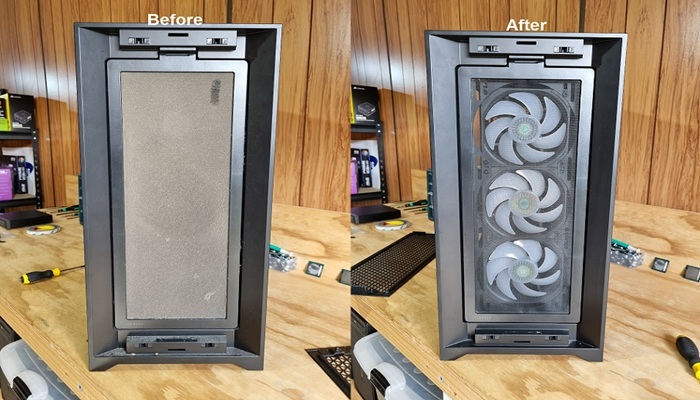
Affordable Computer Dust Cleaning Services
We frequently have customers bring their laptops and PCs to us asking, “Why is my computer so hot?” or “Why are the fans so loud all the time?” In most cases, the cause isn’t a failing part it’s dust buildup and worn-out thermal paste.
Over time, dust collects inside your system and blocks airflow through fans and heatsinks. At the same time, the thermal paste that helps transfer heat away from your CPU and GPU dries out and becomes ineffective. The result is higher temperatures, louder fans, and reduced performance.
Our team provides thorough dust cleaning and professional thermal paste application to get your system running cooler, quieter, and back to how it should be.
What Should I Do Right Now?
If your computer is overheating, ramping fans constantly, or slowing down under load, it’s best not to ignore it. Continued heat puts unnecessary stress on your components and can shorten their lifespan.
Avoid trying to fix it with quick blasts of compressed air, this often pushes dust deeper into the system rather than removing it properly. Opening the device without experience can also lead to damaged connectors or incorrect reassembly.
We recommend shutting the system down, letting it cool, and booking it in for a proper clean. Acting early helps prevent long-term damage.
Issues Our Dust Cleaning Service Covers
When customers contact us about overheating or loud systems, we aim to book them in quickly either at our Auckland-based workshop or via on-site service where suitable. Below are some of the common issues we regularly resolve.
Common warning signs:
- High temperatures during normal use
- Fans running loudly or constantly
- System slowing down under load
- Hot air blowing from vents
- Laptop getting hot to touch
Advanced symptoms we can fix:
- Thermal throttling (performance drops under load)
- Random shutdowns due to heat
- System freezing or stuttering
- Poor gaming or rendering performance
- Fans maxing out even at idle
What Does the Service Include?
We don’t just “blow it out” the service is done properly to ensure long-term results. In addition to dust cleaning we also offer thermal paste application for an additional fee. See below for some of the services we provide.
Dust Cleaning:
- Full internal dust removal
- Fans, vents, and heatsinks cleaned thoroughly
- Airflow restored properly throughout the system
- Power supply intake and exhaust areas cleared
- Fan blades and bearings inspected for wear or noise
Thermal Paste Application:
- Old paste completely removed
- Surfaces cleaned correctly with no residue
- High-quality thermal paste applied in the correct amount
- Heatsink reinstalled with proper, even pressure
Will My Computer Be Safe?
Yes, all work is carried out carefully with the goal of improving performance without risking your system. Your files, programs, and data are not affected during this process.
While we’re working on your device, we also check for any early signs of wear or potential issues so they can be addressed before they become bigger problems.
How Can I Prevent This Happening Again?
Dust buildup is a normal part of using any computer, but there are simple ways to slow it down. Keeping your environment clean, avoiding placing laptops on soft surfaces, and ensuring good airflow around your system all help.
We also recommend periodic servicing. For most users, a proper clean and re-paste every 1–2 years keeps temperatures under control and prevents performance issues.
What If My Computer Is Still Running Hot?
Cleaning and thermal paste replacement can resolve many overheating problems, but they aren't a solution for every situation.
Persistent overheating can also be caused by:
- Failing or worn-out fans
- Blocked or damaged heatsinks
- Poor case airflow
- Faulty temperature sensors
- Failing cooling systems
- Hardware faults
- Undersized or inadequate cooling
If cleaning doesn't resolve the issue, we'll investigate further and let you know what is actually causing the problem.
Should I Upgrade Instead?
In many cases, overheating and poor performance are caused by heat, not outdated hardware. A proper clean and thermal paste replacement can restore performance without the need for costly upgrades.
If your system does need upgrading, we’ll let you know but we always recommend the most practical and cost-effective option first.
Serving the Wider Auckland Region
Based in Henderson, we proudly support customers across Auckland. Whether it’s a laptop running hot, a noisy desktop, or a system that’s lost performance over time, we provide fast, reliable, and professional service.
Contact us today to book a dust cleaning and thermal paste service and get your computer running cooler and quieter again.
